Free Box Plot Calculator
Create professional Box & Whisker Plots instantly. The easiest way to visualize your data distribution.
Make a Box Plot in 3 Steps
Enter Data
Auto-Generate
Download/Copy
Supported Data Formats:
- Comma-separated: 1.5, 2.8, 9.1, 16.2
- Space-separated: 1.5 2.8 9.1 16.2
- Newline-separated: one number per line
- Scientific notation: 1.23e-4, 5.67E+8
- Series mode: use "Group Name: value1, value2, value3" per line to compare multiple groups
- Automatically ignores text and special characters
Universal Standard (R, Python, Google Sheets)
Linear interpolation method, default standard for modern data science software
Learn More About Box Plots
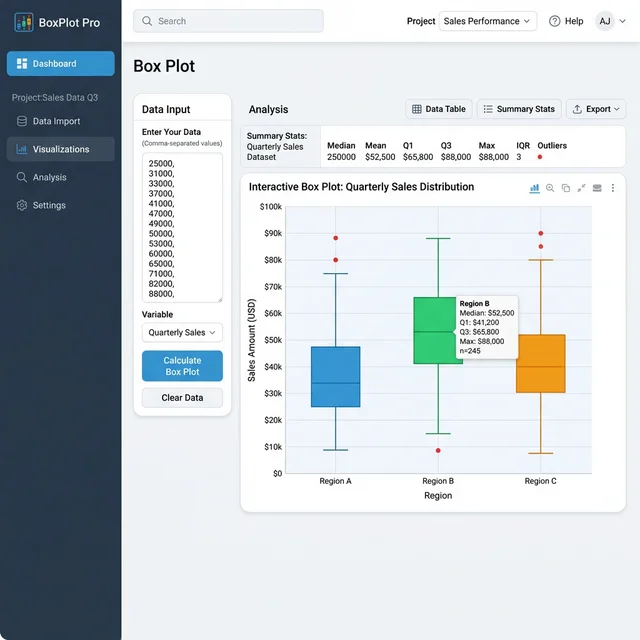
What is a Box Plot?
A Box Plot (also known as a Box and Whisker Plot) is a standardized way of displaying the distribution of data based on a five-number summary:
- Minimum: The lowest data point excluding any outliers.
- First Quartile (Q1): The median of the lower half of the dataset (25th percentile).
- Median (Q2): The middle value of the dataset (50th percentile).
- Third Quartile (Q3): The median of the upper half of the dataset (75th percentile).
- Maximum: The highest data point excluding any outliers.
Why use a Box Plot Calculator?
While you can calculate these statistics by hand, a Box Plot Maker saves time and ensures accuracy, especially with large datasets. It automatically handles complex tasks like:
- Sorting the data.
- Calculating quartiles using precise algorithms (like Tukey's method).
- Identifying outliers using the 1.5×IQR rule.
- Drawing the plot to scale.
How to Interpret a Box Plot
The Box: Represents the middle 50% of the data (Interquartile Range). The line inside the box is the Median.
The Whiskers: Extend from the box to the minimum and maximum values that are not outliers. They show the range of the rest of the data.
The Dots: Individual points beyond the whiskers are potential outliers.
When to Use This Tool
Comparing Distributions
Quickly see how different datasets compare in terms of center and spread.
Identifying Outliers
Instantly spot extreme values that might skew your analysis.
Summarizing Large Datasets
Condense thousands of data points into a simple, readable visual.
Related Tools & Resources
Related Articles
How to Read a Box Plot
Complete guide to interpreting box plots and quartiles
→ Read guideUnderstanding Notched Box Plots
Visualize statistical significance with confidence intervals
→ Read guideHow to Compare Multiple Groups
Side-by-side comparison with grouped box plots
→ Read guideBox Plot in Excel 2025
Step-by-step guide to creating box plots in Excel
→ Read guideComplete Guide to IQR Outlier Detection
Deep dive into the 1.5×IQR rule and Tukey fences
→ Read guideWhy So Many Quartile Methods?
Understand the history behind different calculation methods
→ Read articleFrequently Asked Questions
Statistical concepts explained in plain language
Mathematical Formulas
View the standard mathematical formulas behind the calculations
Quartile Calculation (Method 2)
First Quartile (Q1):
Median (Q2):
Third Quartile (Q3):
Interquartile Range & Outlier Detection
Interquartile Range (IQR):
Outlier Boundaries:
Algorithm Explanation
PlotNerd uses the statistically standard "Method 2 (Median Quartile Method)" for quartile calculations, consistent with major statistical software (such as R, SPSS). All calculation results are verified against authoritative platforms to ensure accuracy.